Recently, an engineering lead asked us a question that keeps coming up: > "What's the difference between a runbook and a playbook? I feel like everyone uses them interchangeably." He wasn't wrong. We've seen plenty of teams with a "runbook" that's actually a playbook, and vice versa. The confusion isn't just semantics, it causes real problems. Your incident responder grabs the "runbook" looking for who to notify, but finds 50 pages of Linux commands instead. Or your engineer opens the "playbook" expecting step-by-step instructions for restarting Kafka, but gets a vague "coordinate with stakeholders" paragraph instead. This pattern shows up repeatedly once teams start running real on-call: runbooks and playbooks serve completely different purposes, and conflating them wastes time during outages. Here's the difference. In incidents: runbooks help you execute fixes; playbooks help you coordinate people. --- ## What You'll Learn - What a runbook actually is (and what it's for) - What a playbook actually is (and what it's for) - The runbook vs playbook difference in one comparison table - Copy-paste templates for both (15-minute playbook, 30-minute runbook) - When to create each (and why most teams need both) - A few real-world failure modes (what breaks when you mix them up) 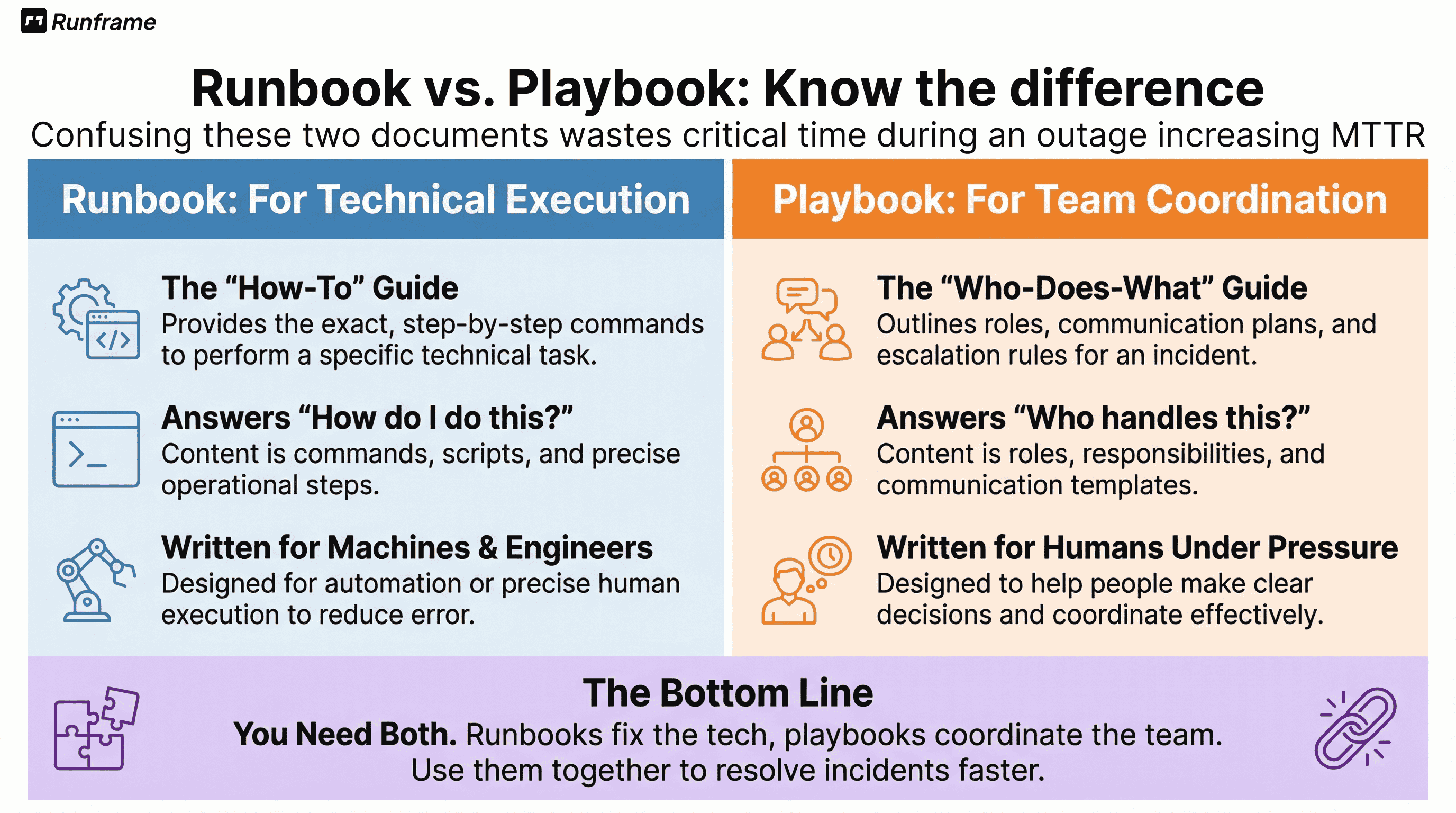 --- ## What is a Runbook? A runbook is **operational documentation**. It's the step-by-step instructions for performing a specific technical task. Think: "How do I restart the database cluster?" or "What's the exact command to flush the Redis cache?" Runbooks are written for **automation or precise human execution**. They assume the reader knows *what* to do, they just need to know *how*. **A runbook looks like this:** ```bash # Flush Redis cache safely redis-cli FLUSHDB # Verify flush redis-cli DBSIZE # Expected output: 0 # If flush fails, check master-slave status redis-cli INFO replication ``` Notice what's missing: no discussion of who to notify, no decision trees, no "if this happens, page that person." That's not what a runbook is for. One engineer described it as: "Our runbooks are basically scripts in plain English. They're the cheat sheet I wish I had when I joined." **Runbooks work best for:** - Repetitive operational tasks (deployments, restarts, backups) - Complex command sequences ("always run X before Y") - Reducing human error in high-stress situations - Onboarding (new engineers can follow the steps safely) *See also: [Runbook definition in the DevOps & SRE glossary](/learn)* --- ## What is a Playbook? A playbook is **coordination documentation**. It's the who, what, and when of incident response, not the technical how. Think: "Who declares an incident?" "When do we page the VP?" "What do we tell customers?" Playbooks are written for **humans making decisions under pressure**. They assume the reader knows *how* to fix the technical problem, they need to know *who* should do what. **A playbook looks like this:** ```markdown ## SEV-2 Incident Declaration Who can declare: Any engineer Where: #incidents What to include: - Severity level (SEV-0/1/2/3) - Service affected - Customer impact (Yes/No) - Current status (Investigating / Identified / Monitoring / Resolved) Within 5 minutes: - @ mention Incident Commander in #incidents - IC assigns roles (Communications Lead, Scribe) - If customer-impacting: Customer Support notified within 10 min Escalation: - 30 min unresolved → IC pages Engineering Manager - 60 min unresolved → EM pages VP Engineering ``` Notice the difference: no bash commands, no technical implementation details. The playbook is about *people and process*, not *machines*. **Playbooks work best for:** - Incident response (who does what, when) - Communication templates (what to say to customers) - Escalation rules (when to page whom) - Role clarity (who's in charge of what) *See also: [Playbook definition in the DevOps & SRE glossary](/learn)* --- ## The Key Differences (Quick Reference) | Aspect | Runbook | Playbook | |---|---------|----------| | **Purpose** | Technical execution | Team coordination | | **Written for** | Automation or precise human steps | Humans making decisions | | **Answers** | "How do I do X?" | "Who handles X?" | | **Content** | Commands, scripts, technical steps | Roles, communication, escalation | | **Usage** | During investigation & fix | During entire incident lifecycle | | **Updates** | When infrastructure changes | When process or team changes | | **Example** | "How to flush Redis cache" | "Who declares a SEV-2 incident" | This is the framework most teams settle on after a few painful incidents. --- ## Which Do You Need? The answer is almost always: **both**. Here's why: **Runbooks without playbooks:** Your engineers know exactly how to restart the database. But nobody knows who's supposed to communicate with customers, or when to escalate to the VP. You resolve the technical incident quickly, but the *coordination* incident drags on for hours. **Playbooks without runbooks:** Everyone knows their role. The Incident Commander is assigned, Communications Lead is drafting customer emails. But the person investigating has to fumble through Stack Overflow because nobody documented how to restart your custom service. The incident takes longer than necessary. A common failure mode: the IC knows the process, but the fixer is still guessing the commands. That's when teams end up writing both. **The sweet spot:** Start with playbooks. They're higher leverage. Then build runbooks for your most common failure modes (database issues, cache problems, third-party API failures). --- ## How to Build Your First Playbook (15-Minute Template) Start here. Copy this template into your incident management system. ### Basic Incident Playbook Template **Severity Levels:** - SEV-0: Critical (revenue stopped, security breach) - SEV-1: High (major feature down, large customer impact) - SEV-2: Medium (degraded performance, some users affected) - SEV-3: Low (minor issue, workaround available) **Who Declares Incidents:** Anyone on the engineering team **Where:** #incidents Slack channel **Incident Commander Role:** - Assigns roles (Communications Lead, Scribe) - Makes decisions - Calls incident resolved **Escalation Rules:** - SEV-0/1: Page on-call lead immediately - 30 min unresolved → Page Engineering Manager - 60 min unresolved → Page VP Engineering **Customer Communication:** - Customer-impacting? → Notify Support within 10 min - Communications Lead drafts status page update - IC approves before publishing That's it. You just built a playbook. --- ## How to Build Your First Runbook (30-Minute Template) Pick your most common incident. Document it. ### Basic Runbook Template **Title:** How to Restart the API Service **When to use this:** - API health check failing - 5xx errors above 5% - Customer reports "can't log in" **Prerequisites:** - SSH access to production - kubectl access to k8s cluster **Steps:** 1. Check current status ```bash kubectl get pods -n production | grep api ``` Expected: 3/3 pods running 2. Identify failing pod ```bash kubectl describe pod api-xxx -n production ``` Look for: CrashLoopBackOff or OOMKilled 3. Restart the service ```bash kubectl rollout restart deployment/api -n production ``` 4. Verify restart ```bash kubectl rollout status deployment/api -n production ``` Expected: "successfully rolled out" 5. Confirm health ```bash curl https://api.yourcompany.com/health ``` Expected: 200 OK **If this doesn't work:** - Check database connectivity - Review recent deployments - Page database on-call **Last updated:** 2026-01-24 **Owner:** Platform team Done. You just built a runbook. --- ## Real-World Scenarios (Composite Examples) These are composites of patterns teams hit; details are anonymized. ### The Team That Learned the Hard Way A Series B infrastructure team had extensive runbooks. Pages of documented commands for every service. But during a SEV-1, nobody knew who was supposed to talk to the CEO. The Incident Commander thought the VP would handle it. The VP thought the IC would handle it. The CEO found out from a customer tweet. Their fix: A simple playbook with a "Who communicates with executives?" section. They still have the runbooks, they just added the coordination layer on top. ### The Team That Kept It Simple A 20-person startup didn't have bandwidth for extensive documentation. They started with a one-page playbook: - Who declares incidents (anyone) - Where they're declared (#incidents) - Three severity levels (SEV-0/1/2) - When to page whom That's it. No runbooks initially. When incidents happened, they added runbook sections for the specific things that kept breaking. Six months later, they had a lightweight but complete system. Their approach was simple: playbook first, runbooks as incidents repeat. ### The Team That Automated A 50-person company took it a step further. Their runbooks were literally executable scripts. When an incident hit, the engineer on call could either: 1. Follow the runbook manually (step-by-step commands) 2. Run the automated script that *was* the runbook Their playbook sat on top, describing who should run which script and when to escalate if the script failed. This is the ideal state: runbooks become executable, playbooks stay human-readable. ### The Team That Wasted 2 Hours A 30-person startup had a great playbook. Everyone knew their roles. Incident Commander was clear, Communications Lead handled customer updates. But when their Postgres database locked up, the on-call engineer spent 2 hours Googling "how to kill postgres connections safely." They'd had this incident before. Three times. Nobody had documented the fix. After that incident, they created a simple runbook: "How to Kill Postgres Connections Without Downtime." Took 20 minutes to write. Saved 2 hours on the next incident. The lesson: Runbooks don't need to be comprehensive. Document the thing that keeps breaking. --- ## The Bottom Line - **Runbooks are for execution**. They answer "how do I do this technically?" - **Playbooks are for coordination**. They answer "who handles this, and when?" - **Most teams need both.** Start with playbooks (higher leverage), add runbooks for common failures - **Don't conflate them.** A runbook that's trying to be a playbook does neither well - **Keep them separate.** Runbooks go in your code repo or docs. Playbooks live in your incident response system One fixes the tech. The other coordinates the humans. Most teams end up with both, playbook first, runbooks for repeat failures. --- ## Common Questions **Which should I build first?** Playbooks. They solve the coordination tax that slows down every incident. Runbooks are useful, but optional for small teams. **Can a single document be both?** Technically yes, but it's usually a mess. Keep them separate. Runbooks in your technical docs, playbooks in your incident management system. **How detailed should runbooks be?** Detailed enough that a new engineer can follow them without guessing. Vague runbooks ("check the logs") are worse than no runbooks. **Do playbooks need to be complicated?** No. A one-page document with severity levels, roles, and escalation rules works for most teams under 100 people. **What if we're too small for this?** Start with a one-page playbook. That's it. You can skip runbooks entirely until you hit scale. **What tools should I use for runbooks?** Keep it simple. Git repo, Markdown files in your docs, or a wiki (Notion, Confluence). The best tool is the one your team actually uses. We've seen teams use everything from Google Docs to specialized runbook software. The format matters less than the content. **What tools should I use for playbooks?** Your incident management system is the best place. If you're using [Slack for incident management](/blog/incident-response-playbook), pin the playbook to your #incidents channel. If you're using a dedicated tool, store it there. The key: make it visible during incidents, not buried in a wiki nobody checks. **How often should I update runbooks?** Update them when your infrastructure changes. Deployed a new service? Update the runbook. Changed your Redis configuration? Update the runbook. A stale runbook is worse than no runbook, someone will follow it and make things worse. **How often should I update playbooks?** Update them when your team or process changes. New escalation path? Update the playbook. Added a customer support team? Update who gets notified. Playbooks have a longer shelf life than runbooks, but they still need refreshing every few months. **What's the difference between a runbook and a runbook in incident response?** Same thing, different context. "Runbook" is the general term for step-by-step technical documentation. An "incident response runbook" is a runbook you use during an incident. The structure is identical commands, expected outputs, what to do if it fails. **Do I need an incident response runbook if I have a playbook?** Yes. Your playbook tells you *who* does what. Your incident response runbook tells you *how* to fix the specific technical problem. They work together. **Can I automate runbooks?** Yes, and you should. Many teams convert their runbooks into executable scripts over time. Start with human-readable commands, then automate as you gain confidence. The playbook describes when to run the automated script and what to do if it fails. --- ## Next Reads - [Incident Severity Levels: The Framework That Actually Works](/blog/incident-severity-levels) - [On-Call Rotation: Primary + Backup Schedule, Escalation Rules, and Handoffs](/blog/on-call-rotation-guide) - [Post-Incident Review Templates: What Works (3 Ready-to-Use)](/blog/post-incident-review-template) <script type="application/ld+json"> { "@context": "https://schema.org", "@type": "FAQPage", "mainEntity": [ { "@type": "Question", "name": "Which should I build first: a runbook or a playbook?", "acceptedAnswer": { "@type": "Answer", "text": "Start with playbooks. They solve the coordination tax that slows down every incident. Runbooks are useful, but optional for small teams." } }, { "@type": "Question", "name": "Can a single document be both a runbook and a playbook?", "acceptedAnswer": { "@type": "Answer", "text": "Technically yes, but it's usually a mess. Keep them separate. Runbooks belong in your technical docs or code repository, while playbooks live in your incident management system." } }, { "@type": "Question", "name": "What is the main difference between a runbook and a playbook?", "acceptedAnswer": { "@type": "Answer", "text": "Runbooks are for execution - they answer 'how do I do this technically?' Playbooks are for coordination, they answer 'who does what, and when?' Runbooks contain commands and technical steps; playbooks contain roles, escalation rules, and communication guidance." } }, { "@type": "Question", "name": "How detailed should runbooks be?", "acceptedAnswer": { "@type": "Answer", "text": "Detailed enough that a new engineer can follow them without guessing. Vague runbooks like 'check the logs' are worse than no runbooks at all. Include specific commands, expected outputs, and what to do if something fails." } }, { "@type": "Question", "name": "Do playbooks need to be complicated?", "acceptedAnswer": { "@type": "Answer", "text": "No. A one-page document with severity levels, roles, and escalation rules works for most teams under 100 people. The goal is clarity during high-stress moments, not comprehensive process documentation." } }, { "@type": "Question", "name": "What tools should I use for runbooks?", "acceptedAnswer": { "@type": "Answer", "text": "Keep it simple. Git repo, Markdown files in your docs, or a wiki like Notion or Confluence. The best tool is the one your team actually uses. The format matters less than the content." } }, { "@type": "Question", "name": "What tools should I use for playbooks?", "acceptedAnswer": { "@type": "Answer", "text": "Your incident management system is the best place. If you're using Slack for incident management, pin the playbook to your #incidents channel. The key is visibility during incidents, not buried in a wiki nobody checks." } }, { "@type": "Question", "name": "How often should I update runbooks?", "acceptedAnswer": { "@type": "Answer", "text": "Update them when your infrastructure changes. Deployed a new service? Update the runbook. Changed configuration? Update the runbook. A stale runbook is worse than no runbook, someone will follow it and make things worse." } }, { "@type": "Question", "name": "Can I automate runbooks?", "acceptedAnswer": { "@type": "Answer", "text": "Yes, and you should. Many teams convert their runbooks into executable scripts over time. Start with human-readable commands, then automate as you gain confidence. The playbook describes when to run the automated script and what to do if it fails." } } ] } </script>
runbookplaybookincident-management
Runbook vs Playbook: The Difference That Confuses Everyone
Runbooks document technical execution. Playbooks document roles, escalation, and comms. Here's when to use each, with copy-paste templates.
Runframe TeamJan 24, 202610 min read