# How to Reduce Context Switching During Incidents The outage isn't the problem. It starts the second after the alert fires. You're trying to diagnose what broke, but first you're fielding questions: who's leading this? Which channel? What do we tell support? Ticket or doc? This tax compounds fast, and nobody talks about it. But incident management coordination overhead silently kills engineering productivity more than most team leads realize. We talked to engineers and leads about how their teams handle incidents. Same story everywhere: no one needed another dashboard. They needed a way to coordinate without context-switching themselves to death. This is what we learned, with no fluff. If you're looking for practical ways to reduce coordination overhead during incidents, keep reading. --- ## What Is Incident Management Coordination? Incident management coordination is how your team shares updates, assigns ownership, and stays aligned during a production incident. It's the communication and organizational layer that sits on top of the technical troubleshooting. Effective incident coordination includes: - **Clear ownership** - Who's leading the response (usually the [incident commander](/learn/incident-commander)) - **Status visibility** - Current state and next steps - **Context preservation** - Key decisions and **incident timeline** - **Role clarity** - Who does what during the incident - **Handoff protocols** - How to transfer ownership - **Escalation path** - When and how to escalate **incident severity** levels The problem: Most teams focus on technical diagnosis tools (monitoring, logs, traces) but neglect coordination tools. The result is context switching, duplicate work, and constant "what's happening?" questions that slow down resolution. This directly impacts [MTTR](/learn/mttr) (mean time to recovery) and **mean time to resolution**. Good coordination doesn't fix the outage faster, but it removes friction so engineers can focus on the actual fix. --- ## Incident Coordination Approaches Compared <table> <caption>Incident coordination approaches compared by setup time, team size fit, and failure conditions</caption> <thead> <tr> <th>Approach</th> <th>Setup Time</th> <th>Works For</th> <th>Breaks When</th> </tr> </thead> <tbody> <tr> <td>Ad-hoc in Slack DMs</td> <td>0 min</td> <td><10 people</td> <td>Multiple incidents or unclear ownership</td> </tr> <tr> <td>Single #incidents channel</td> <td>5 min</td> <td>10-50 people</td> <td>Multiple concurrent incidents</td> </tr> <tr> <td><strong>Dedicated incident threads</strong></td> <td><strong>10 min</strong></td> <td><strong>20-100 people</strong></td> <td><strong>Nobody enforces the pattern</strong></td> </tr> <tr> <td>Enterprise incident tools</td> <td>Hours/days</td> <td>100+ people, compliance needs</td> <td>Too much overhead for team size</td> </tr> <tr> <td colspan="4" class="text-sm text-[var(--text-secondary)] italic"> <strong>Note:</strong> If you're migrating from OpsGenie (shutting down April 2027), see our <a href="/blog/opsgenie-migration-guide">complete migration guide</a> with timelines and pricing comparisons. </td> </tr> <tr> <td>Custom internal tools</td> <td>Weeks</td> <td>Large orgs with dedicated platform teams</td> <td>Maintenance burden</td> </tr> </tbody> </table> --- ## How Coordination Overhead Kills Engineering Productivity ### 1) Context switching kills flow when you need it most During an incident, you're jumping between Slack, tickets, monitoring tools, a Google doc, and maybe a Zoom call (or virtual [war room](/learn/war-room)). Each switch feels like thirty seconds. But it adds up, and it murders your focus at the worst possible time. Mid-sentence in the [runbook](/learn/runbook), and suddenly you've forgotten what you were about to try. That lost flow repeats throughout the entire incident. Following the **runbook** becomes impossible when you're constantly context-switching. The fix isn't another tool. It's fewer surfaces. Teams that felt less burned out had one place where coordination happened, usually Slack. The technical diagnosis still happened in Datadog or wherever, but status updates, decisions, and handoffs stayed in one thread. What works? Make Slack your incident workspace, not just your alerting channel. Current status, who owns what, next steps-all in one place. 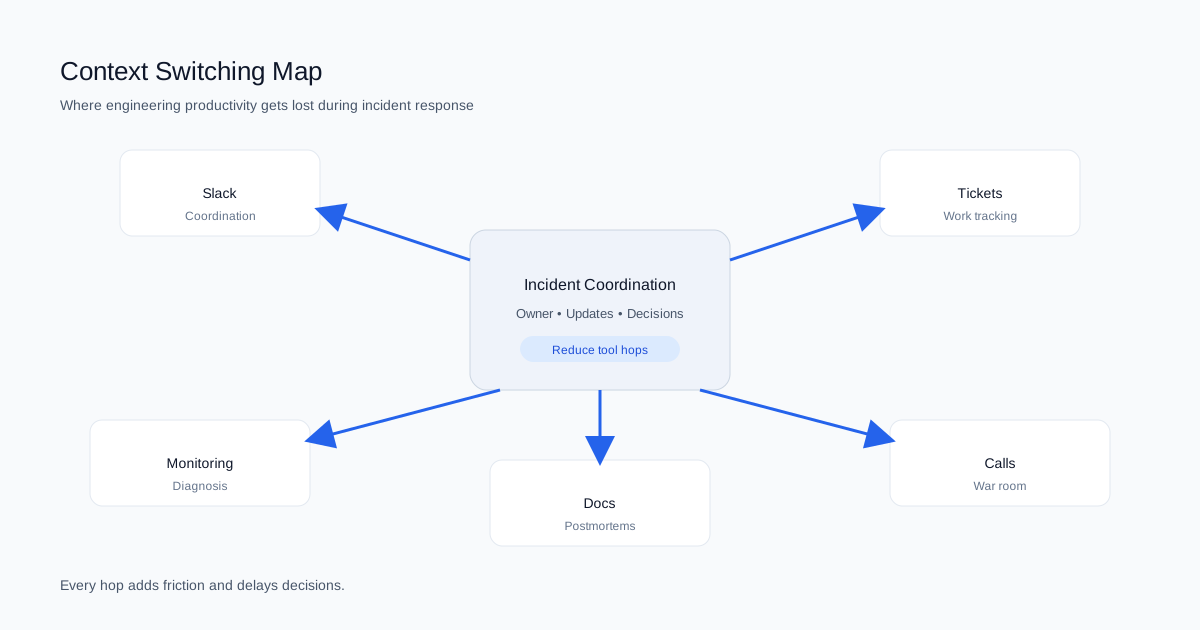 ### 2) Your on-call schedule is invisible when it matters Most teams have an on-call schedule. The problem? It's disconnected from where the incident is actually happening. Small teams just know who to ping. As you grow past 30-40 people, that breaks down. Someone pings the wrong person, or everyone waits while the right person is in a meeting. Now you're playing operator instead of fixing the problem. For more on **on-call coordination**, see [our on-call rotation guide with weekly schedules, 5-minute no-response rules, and compensation benchmarks](/blog/on-call-rotation-guide). A team lead told us: "We had coverage. We just never knew who was actually paying attention right now." The fix: Surface on-call info directly in the incident channel. Not a link to the on-call tool. The actual person's name, their backup, and how to **escalate**. Right there. Clear **escalation** paths prevent confusion during **SEV-0** and **SEV-1** incidents when every second counts. ### 3) Your postmortems exist but nobody reads them Every team writes postmortems. Almost nobody reads them during the next incident. They're too long. Too formal. Buried in Confluence. When you're in the middle of fixing something at 2am, you want a short list of what to check and what not to do. Format matters more than completeness. An engineering manager put it: "We write these things like college essays and then never open them again." Instead: Keep the learning short and keep it in the incident channel. A few bullets. What changed. What to watch for. Make it show up when the next similar incident starts. This **incident timeline** should be easily accessible during the next outage. For **post-incident review templates** that work, see [our post-incident review template guide with 3 downloadable formats](/blog/post-incident-review-template). ## Incident Management Best Practices from Fast-Moving Teams The teams that moved fast didn't chase perfect process. They cut overhead. Same patterns kept showing up. ### Work where people already are If your team lives in Slack, making them use another tool is friction. This isn't about being "Slack-native" for marketing reasons. Engineers already have Slack open when the alert fires. That's just reality. A team adopted a fancy incident tool and dropped it after a week. Their reason? One more tab to check while everything's on fire. The tool was fine; the workflow wasn't. Make the incident channel your home base. Pin the current status. Post updates every 15-30 minutes. If someone joins late, they should read the pinned message and know what's happening. For customer-facing incidents, the **incident commander** should also update the **status page** to keep customers informed. 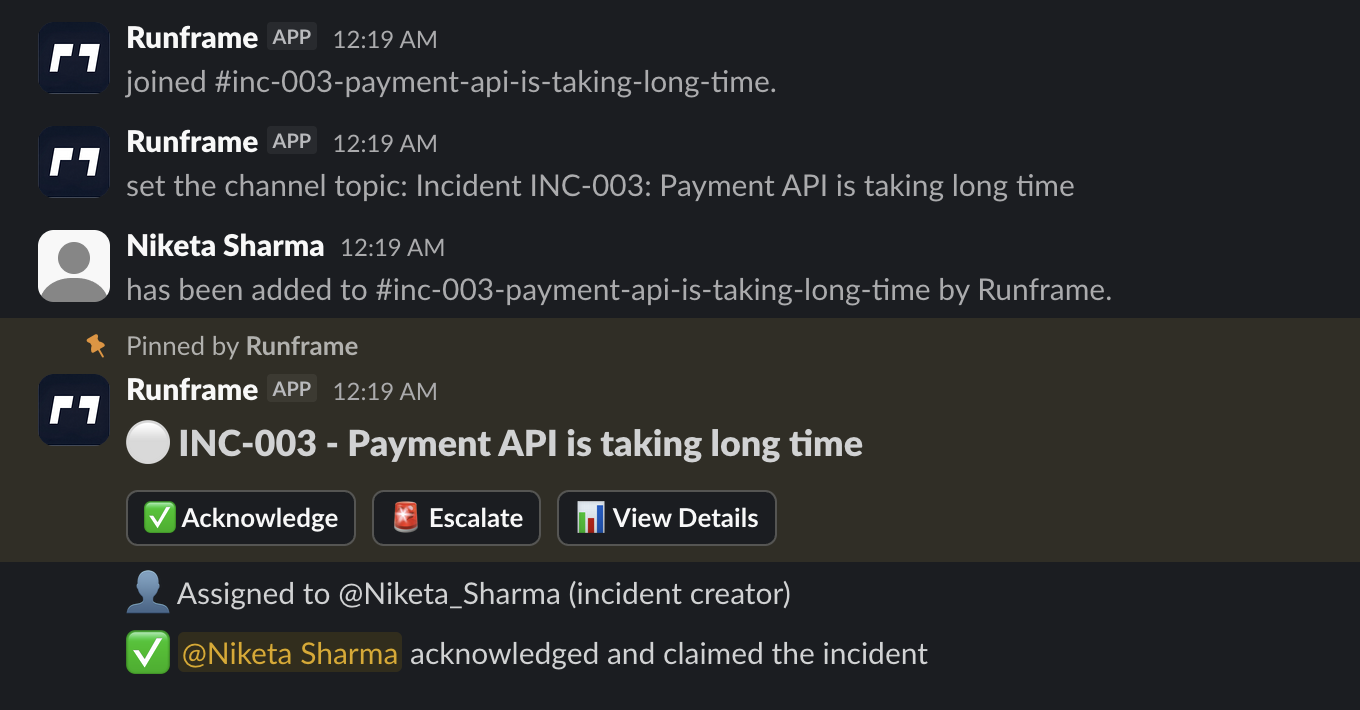 ### Automate the boring stuff, not the thinking Light automation goes a long way. The best teams automated mechanical tasks, not judgment calls. They didn't want a bot making decisions. They wanted it to handle the busywork. Good automation: - Creates the channel and invites the right people - Posts a status template - Logs **incident timeline** timestamps automatically - Assigns an **incident commander** automatically Bad automation: - Spam notifications - Forces rigid steps when things are chaotic - Creates work just to feed the tool Automate what clears the path. Don't automate what sets the route. ### Stay invisible until needed Nobody wants a tool that nags them on quiet days. The best systems disappear until an incident starts. That's how you get adoption-people don't feel like they're "using a tool" constantly. If I have to update some system every time I make a config change, I'll just stop. That's human nature, not laziness. Normal days should feel normal. Incident days should feel supported. ## Three Incident Coordination Patterns from Real Teams These aren't perfect playbooks. Just examples of what worked. ### The team that kept it simple They ran everything through a single #incidents channel. When something broke, they'd create a thread, name the owner in the first message, and keep all updates there. No separate ticket during the incident. Just one summary afterward. Basic, but it worked because everyone agreed to follow it. The ritual was light. ### The team that needed more structure As they grew, communication overhead got painful. They added primary and backup on-call rotations and made one rule: all updates go in the incident channel. No side DMs. None. That one rule cut confusion immediately. People stopped asking for updates because the updates were already there. More tools didn't help. More consistency did. ### The team that stopped overengineering A larger team evaluated an enterprise incident tool, tried it, and found it overwhelming. They switched to a lightweight workflow that ran entirely in Slack. Their test: If a new engineer can't run an incident after a 10-minute walkthrough, we simplify it. They weren't anti-tool. They just hated friction. ## Why Simple Incident Management Beats Complex Tools Incident response is one of those areas where complexity feels responsible. More fields, more statuses, more process. But the teams with better outcomes cut complexity first. Here's the thing: mature teams have clear practices. Not necessarily more practices. They know what to do when an incident starts. They don't waste time debating the process. The easiest way to add complexity? Buy a tool that makes you define everything upfront. Feels safe. Feels comprehensive. Usually results in half-finished setup and partial adoption. If you can't explain your incident process to a new hire in five minutes, it's too complicated. ## 5-Step Incident Management Checklist Follow these steps for every incident: **1. Declare and assign (30 seconds)** - Create incident thread in #incidents or dedicated channel - First message: "@alice is incident commander for checkout API errors" - Name severity level if clear (SEV0/1/2/3) **2. Post initial status (1 minute)** - What's broken: "Checkout API returning 500 errors" - Current hypothesis: "Recent deploy may have broken payment processing" - Who's investigating: "@bob is debugging, @carol on standby" **3. Set update cadence and pin it (30 seconds)** - Post: "Updates every: SEV0 10 min · SEV1 15 min · SEV2 30 min · SEV3 60 min" - Pin this message to the channel **4. Capture decisions as they happen (ongoing)** - Rollback decision: "Rolling back deploy #1234 due to checkout errors" - Escalation: "Escalating to EM, stuck on database connection issue" - Workaround: "Disabled feature flag for affected region" **5. Post resolution summary (2 minutes)** - What broke: [system/component] - Why it broke: [cause] - What fixed it: [rollback/fix/flag/scale] - Postmortem owner + deadline: "@alice, due EOD Thursday" ([use our templates](/blog/post-incident-review-template)) **Total overhead: ~10 minutes for entire incident** ## Looking for Incident Management Software? We're building incident coordination for Slack: auto-create incident channels, visible on-call ownership, status templates, and timeline capture without context switching. Built for teams 20-100 people who want coordination, not complexity. [Join the waitlist for early access](/contact) --- **Want the next step?** Read [our post-incident review template guide with action-item tracking](/blog/post-incident-review-template) or [our on-call rotation guide with burnout-prevention schedules](/blog/on-call-rotation-guide). Read the full research: [Scaling Incident Management: What We Learned from 25+ Engineering Teams](/blog/scaling-incident-management) ## Incident Coordination FAQ **What is incident response coordination?** How your team shares updates, assigns ownership, and stays aligned during an incident. Good coordination prevents duplicate work, confusion, and constant "what's the status?" pings. **What tools do I need for incident management?** Start with Slack (or your team chat tool), your monitoring system, and a simple doc template. Add dedicated incident management software only when coordination overhead becomes painful (usually 30-50+ people). **How do I reduce context switching during incidents?** Centralize coordination in one place (usually Slack). Post all status updates, decisions, and handoffs in the incident thread. Avoid side DMs and fragmented conversations across multiple tools. **What's the difference between incident management and incident response?** Incident response is the technical work of diagnosing and fixing the issue. Incident management is the coordination layer-who's leading, how to communicate, when to escalate, how to document. You need both. **When should I assign an incident commander?** For any SEV-0 or SEV-1 incident, or when multiple people are involved. The incident commander doesn't fix the problem-they coordinate communication, remove blockers, and maintain the timeline. **How long should incident updates be?** One to three sentences every 15-30 minutes. "Database queries timing out, investigating replica lag" is enough. Longer updates slow the team down and create context switching. Save detailed analysis for the postmortem. **How does context switching hurt productivity during incidents?** Every tool switch breaks your flow and forces you to reorient. These interruptions stack up over an incident and slow down resolution even when the technical fix is straightforward. This directly impacts **MTTR** (mean time to resolution). **What's a good on-call rotation for growing teams?** Start with a primary and backup that's visible where incidents happen. The key isn't the perfect schedule. It's fast, reliable routing when something breaks. ---
incident-managementincident-responsecoordination
Reducing Context Switching: The 10-Minute Incident Coordination Framework for Slack
Outages are expensive; coordination is harder. Use our 10-minute framework to cut context switching and speed up MTTR during Slack-based incidents.
Runframe TeamDec 22, 20257 min read